Sunday, July 22, 2012

Providing XACML Fine Grained Authorization to WebApps : Using WSO2 Identity Server - Part 2

I have discussed about XACML Fine Grained Authorization and how we can use WSO2 IS as a XACML engine in the previous post, Providing XACML Fine Grained Authorization to WebApps : Using WSO2 Identity Server - Part 1 .

So as we know we can use WSO2 Application Server or Apache Tomcat or any other web container to host our web apps. So if there is a requirement to provide authorization to those web apps? That means some one want to allow access to there web apps on a fine grained manner. This has been done in the WSO2 platform. That was a project of mine. So using WSO2 Identity server as the XACML Policy Decision Point (PDP) we can provide fine grained authorization to webapps. This PDP can be access via a web service called Entitlement Service.

So what will the Policy Enforcement Point(PEP) for the webapp authorization ? After having some discussions we thought that a Servlet Filter will be the ideal solution. Any webapp developer can define a servlet filter which they want to use. Also we can use servlet filter in any kind of webapp container.

On that decision we have created a servlet filter which user can use to provide authorization to their web apps. We gave the name Entitlement Servlet Filter to that. It uses a Proxy to communicate with WSO2 Identity Server. The Entitlement PEP Proxy is responsible for following tasks,
  • There is a service in the WSO2 IS called Entitlement Service, that service is used to evaluate XCAML requests.
  • That is a admin service which can be used by the Admin Role.
  • To use that service we have to log in to the IS using AuthenticationAdmin Service.
  • So PEP Proxy log in to the IS as admin, so we can use it's Entitlement Service to evaluate requests coming.
  • We provide following parameters to PEP Proxy to evaluate the request against XACML policies in the WSO2 IS, UserName, ResourceName, Action and Environment. So it queries IS using the provided parameters and gives us the authorization decision.
The following digram shows how the the servlet filter gets the authorization decision,


The next problem is how we should obtain the parameters, UserName, ResourceName, Action and Environment. Exept the user name others we have. Because they are all related tot the web app. How we can get the user name? For that we used J2EE authentication mechanisms,
  • Basic Authentication
  • Client Cert Authentication
  • Digest Authentication
  • Form Authentication
After the authentication we can obtain the username in the the servlet filter. So all the parameters are found now.
As shown in the digram, when a request comes to a particular weapp which has the engaged Entitlement Servlet Filter it obtains the parameters UserName, ResourceName, Action and Environment. Then it initialize the PEP Proxy to communicate with WSO2 IS. After that it send the parameters and get the Entitlement decision. On the provided decision it stop or pass the request which has came to the web app. 

The next critical thing is how the user can engage the Entitlement Servlet Filter. For that we  use the web.xml. The following shows a example web.xml which configures the Entitlement Servlet Filter.


<?xml version="1.0" encoding="UTF-8"?>
<web-app xmlns:xsi="http://www.w3.org/2001/XMLSchema-instance"
         xmlns="http://java.sun.com/xml/ns/javaee"
         xsi:schemaLocation="http://java.sun.com/xml/ns/javaee http://java.sun.com/xml/ns/javaee/web-app_2_5.xsd"
         id="WebApp_ID" version="2.5">

    <!-- Sample deployment descriptor configuration for EntitlementFilter -->

    <!-- The scope in which the subject would be available.  Legal values are basicAuth,request-param, request-attribute, session -->
    <context-param>
        <param-name>subjectScope</param-name>
        <param-value>request-param</param-value>
    </context-param>

    <!-- The name of the identifier by which to identify the subject -->
    <context-param>
        <param-name>subjectAttributeName</param-name>
        <param-name>userName</param-name>
    </context-param>

    <!-- The username to perform EntitlementService query-->
    <context-param>
        <param-name>userName</param-name>
        <param-value>admin</param-value>
    </context-param>

    <!-- The password to perform EntitlementService query -->
    <context-param>
        <param-name>password</param-name>
        <param-value>admin</param-value>
    </context-param>

    <!-- The URL to perform EntitlementService query-->
    <context-param>
        <param-name>remoteServiceUrl</param-name>
        <param-value>https://localhost:9443/services</param-value>
    </context-param>

    <!-- EntitlementFilter Settings -->
    <filter>
        <filter-name>EntitlementFilter</filter-name>
        <filter-class>org.wso2.carbon.identity.entitlement.filter.EntitlementFilter</filter-class>

        <!--
  Client class that extends AbstractEntitlementServiceClient. Legal values are basicAuth, soap and thrift.
  Default is 'thrift'.
        -->
        <init-param>
            <param-name>client</param-name>
            <param-value>basicAuth</param-value>
        </init-param>

        <!--
         Decision caching at PEPProxy. Legal values are simple and carbon.This parameter is optional.
         If not specified no caching is done.
        -->
        <init-param>
            <param-name>cacheType</param-name>
            <param-value>simple</param-value>
        </init-param>

        <!--
         Maximum number of cached entries. Legal values are between 0 and 10000 .
         Only works with caching.
        -->
        <init-param>
            <param-name>maxCacheEntries</param-name>
            <param-value>1000</param-value>
        </init-param>

        <!-- Time interval for which cached entry is valid. Only works with simple cache type. -->
        <init-param>
            <param-name>invalidationInterval</param-name>
            <param-value>100000</param-value>
        </init-param>

        <!-- URL ro redirect to if authorization fails -->
        <init-param>
            <param-name>authRedirectUrl</param-name>
            <param-value>/index.jsp</param-value>
        </init-param>

        <!-- Thrift host to be used if using 'thrift' client -->
        <init-param>
            <param-name>thriftHost</param-name>
            <param-value>localhost</param-value>
        </init-param>

        <!-- Thrift port to be used if using 'thrift' client -->
        <init-param>
            <param-name>thriftPort</param-name>
            <param-value>10500</param-value>
        </init-param>
    </filter>

    <!-- Filter mappings used to configure URLs that need to be authorized  -->
    <filter-mapping>
        <filter-name>EntitlementFilter</filter-name>
        <url-pattern>/protected.jsp</url-pattern>
    </filter-mapping>

    <!-- Mandatory mapping that needs to be present to work with PEP cache update authorization-->
    <filter-mapping>
        <filter-name>EntitlementFilter</filter-name>
        <url-pattern>/updateCacheAuth.do</url-pattern>
        <dispatcher>FORWARD</dispatcher>
    </filter-mapping>

    <!-- EntitlementCacheUpdateServlet settings-->
    <servlet>
        <servlet-name>EntitlementCacheUpdateServlet</servlet-name>
        <servlet-class>org.wso2.carbon.identity.entitlement.filter.EntitlementCacheUpdateServlet
        </servlet-class>

        <!-- HTTPS port of the web container used when redirecting request to come over https port for cache update authentication -->
        <init-param>
            <param-name>httpsPort</param-name>
            <param-value>9453</param-value>
        </init-param>

        <!-- Authentication mode for cache update. Legal values are webapp and wso2is -->
        <init-param>
            <param-name>authentication</param-name>
            <param-value>webapp</param-value>
        </init-param>

        <!-- Authentication page used for cache update authentication. Legal values are default and custom -->
        <init-param>
            <param-name>authenticationPage</param-name>
            <param-value>default</param-value>
        </init-param>

        <!-- Authentication page URL used for cache update authentication. Works only with custom for authenticationPage -->
        <init-param>
            <param-name>authenticationPageUrl</param-name>
            <param-value>/updateCache.html</param-value>
        </init-param>
    </servlet>

    <!-- Servlet mapping needed for cache update authentication -->
    <servlet-mapping>
        <servlet-name>EntitlementCacheUpdateServlet</servlet-name>
        <url-pattern>/updateCache.do</url-pattern>
    </servlet-mapping>
</web-app>

Providing XACML Fine Grained Authorization to WebApps : Using WSO2 Identity Server - Part 1

What is XACML Fine Grained Authorization ?

When we talk about a resource ( Here resource is the Webapp hosted in either WSO2 Application Server, Apache Tomcat  etc.) we have to talk about authorization of the users who use those resources. That means some users are authorized to uses the resource and some are not. So what is mean by Fine Grained Authorization ? Traditionally authorization of the user for resource is decided by the users,resource and the action which user does on the resource. But  if we can provided authorization based on user, resource, action user does on resources, environment, time, user's role etc. that is fine grained authorization. We use more details of the scenario to decide the authorization of the user. For a example if there is requirement like this, " This document can be edited by only AndunSLG, who is a Teacher and between 8am to 10am at the school office premises". The given requirement is a fine grained authorization requirement.
To evaluate such requirement against users request, we have to document those fine grained authorization requirements. Those are called Polices. XACML is used to document these kind of polices. We can evaluate user's requirements against these XACML polices using a XACML engine.
We can use WSO2 Identity Server for this requirement. It have a XACML Policy Engine where users can evaluate there requests. Also it provides so many functionalities related to XACML Authorization At the end I have given lot of references where you can learn about XACML.

References,

XACML Policy Language
WSO2 Identity Server

Sunday, July 1, 2012

Resolve dependencies in Apache Ant using Apache Ivy

Most of you have experience that we can use Apache Maven to automate build processes. Also we can use Apache Ant forthe same process. But when we use Maven we can resolve our dependencies of the project easily. The only thing required is adding your dependencies to the pom.xml as given bellow.

<dependencies>
        <dependency>
            <groupId>org.apache.cxf</groupId>
            <artifactId>cxf-rt-frontend-jaxws</artifactId>
        </dependency>
        <dependency>
            <groupId>org.apache.cxf</groupId>
            <artifactId>cxf-rt-transports-http</artifactId>
        </dependency>
        <dependency>
            <groupId>junit</groupId>
            <artifactId>junit</artifactId>
            <scope>compile</scope>
        </dependency>
</dependencies>

But when use Apache Ant, we have to do some specifics tasks to resolve dependencies in a intelligent manner. Why I say in a intelligent manner
means if we know all the dependencies exactly, we can use following command to download all the jar files needed to our project.
<get src="http://repo1.maven.org/maven2/org/apache/ivy/ivy/${ivy.install.version}/ivy-${ivy.install.version}.jar" dest="${ivy.jar.file}" usetimestamp="true"/>
But if don't know all the dependency tree, we are in trouble. So in that case we can use Apache Ivy to resolve all the dependencies. Please look at the given Apache Ant build.xml file.
<project default="compile-all" xmlns:ivy="antlib:org.apache.ivy.ant">
    <property name="classes" value="classes"/>
    <property name="src" value="src"/>
    <property name="ivy.install.version" value="2.0.0-beta1" />
    <property name="ivy.jar.dir" value="${basedir}/ivy" />
    <property name="ivy.jar.file" value="${ivy.jar.dir}/ivy.jar" />
    <path id="class.path">
        <pathelement path="${java.class.path}"/>
        <fileset dir="./lib">
            <include name="**"/>
        </fileset>
    </path>
    <target name="clean">
        <delete dir="${classes}"/>
    <delete dir="${lib}"/>
    <delete dir="${ivy}"/>
    </target>
    <target name="init" depends="clean">
        <mkdir dir="${classes}"/>
    </target>
    <!-- #######Downloading and Installing Apache Ivy#######-->
    <target name="download-ivy" unless="skip.download" depends="init">
        <mkdir dir="${ivy.jar.dir}"/>
        <get src="http://repo1.maven.org/maven2/org/apache/ivy/ivy/${ivy.install.version}/ivy-${ivy.install.version}.jar" dest="${ivy.jar.file}" usetimestamp="true"/>
    </target>
    <target name="install-ivy" depends="download-ivy" >
        <path id="ivy.lib.path">
            <fileset dir="${ivy.jar.dir}" includes="*.jar"/>
        </path>
        <taskdef resource="org/apache/ivy/ant/antlib.xml" uri="antlib:org.apache.ivy.ant" classpathref="ivy.lib.path"/>
    </target>    
    <!-- ######################################-->
    <!-- ###########Resolving Dependencies Using Ivy######-->
    <target name="getDependency" depends="install-ivy">
        <ivy:retrieve />
    </target> 
    <!-- ######################################-->
    <target name="compile-all" depends="getDependency">
        <javac debug="on" destdir="${classes}">
            <src path="${src}"/>
            <classpath refid="class.path"/>
        </javac>
    </target>       
</project>  
Here in this project we need, Junit and Spring Framework for compile and run the project. To get those jars to our project we use Ivy. First of all we have to get Ivy downloaded. After downloading Ivy we can retrieve our dependencies. Those dependencies have to be specified in file called ivy.xml which exists in the working directory. For this project this is the ivy.xml,
<?xml version="1.0" encoding="UTF-8"?>
<ivy-module version="2.0" xmlns:xsi="http://www.w3.org/2001/XMLSchema-instance" xsi:noNamespaceSchemaLocation="http://ant.apache.org/ivy/schemas/ivy.xsd">
<info organization="andunslg" module="my_project"/>
    <dependencies>
        <dependency org="junit" name="junit" rev="4.0" transitive="false"/> 
        <dependency org="org.springframework" name="spring-context" rev="3.0.7.RELEASE" transitive="false"/>
        <dependency org="org.springframework" name="spring-core" rev="3.0.7.RELEASE" transitive="false"/>
        <dependency org="org.springframework" name="spring-beans" rev="3.0.7.RELEASE" transitive="false"/>         
    </dependencies>
</ivy-module>
Here you can see that dependencies are specified in our manner ,
<dependency org="junit" name="junit" rev="4.0" transitive="false"/> 
In that org, name, version are very important. Because Ivy use those details to download the jars from the public repo. Also in default Ivy download all the transitive dependencies of the jars. We can stop that by saying transitive="false". Ivy will download all the jars to a called lib in the working directory. After that we can use that in our class path. If you need to find org, name, version of your jars, pleas use this link. http://mvnrepository.com/ In that details are given in this way,
<dependency>
    <groupId>org.springframework</groupId>
    <artifactId>spring-core</artifactId>
    <version>3.0.7.RELEASE</version>
</dependency>
Here groupId=org, artifactId=name. So you can create your ivy.xml using those details. Hope this helps you.Contact me for further clarifications. The follwoing shell output show how this build.xml works,

andunslg@andunslg-Dell-System-Vostro-3450:~/temp$ ant
Buildfile: /home/andunslg/temp/build.xml

clean:
   [delete] Deleting directory /home/andunslg/temp/classes

init:
    [mkdir] Created dir: /home/andunslg/temp/classes

download-ivy:
      [get] Getting: http://repo1.maven.org/maven2/org/apache/ivy/ivy/2.0.0-beta1/ivy-2.0.0-beta1.jar
      [get] To: /home/andunslg/temp/ivy/ivy.jar
      [get] Not modified - so not downloaded

install-ivy:

getDependency:
No ivy:settings found for the default reference 'ivy.instance'.  A default instance will be used
no settings file found, using default...
[ivy:retrieve] :: Ivy 2.0.0-beta1 - 20071206070608 :: http://ant.apache.org/ivy/ ::
:: loading settings :: url = jar:file:/home/andunslg/temp/ivy/ivy.jar!/org/apache/ivy/core/settings/ivysettings.xml
[ivy:retrieve] :: resolving dependencies :: wso2#spring;working@andunslg-Dell-System-Vostro-3450
[ivy:retrieve]     confs: [default]
[ivy:retrieve]     found junit#junit;4.0 in public
[ivy:retrieve]     found org.springframework#spring-context;3.0.7.RELEASE in public
[ivy:retrieve]     found org.springframework#spring-core;3.0.7.RELEASE in public
[ivy:retrieve]     found org.springframework#spring-beans;3.0.7.RELEASE in public
[ivy:retrieve] :: resolution report :: resolve 1517ms :: artifacts dl 20ms
    ---------------------------------------------------------------------
    |                  |            modules            ||   artifacts   |
    |       conf       | number| search|dwnlded|evicted|| number|dwnlded|
    ---------------------------------------------------------------------
    |      default     |   4   |   0   |   0   |   0   ||   4   |   0   |
    ---------------------------------------------------------------------
[ivy:retrieve] :: retrieving :: wso2#spring
[ivy:retrieve]     confs: [default]
[ivy:retrieve]     0 artifacts copied, 4 already retrieved (0kB/30ms)

compile-all:
    [javac] /home/andunslg/temp/build.xml:39: warning: 'includeantruntime' was not set, defaulting to build.sysclasspath=last; set to false for repeatable builds
    [javac] Compiling 1 source file to /home/andunslg/temp/classes

BUILD SUCCESSFUL
Total time: 12 seconds
           

Saturday, June 30, 2012

WSDL2Java conversion in Apache Ant using Apache CXF

If you use  Apache Ant to automate your build process, most of the cases this will be a very useful thing to remember. If you want to to generate a Java code using WSDL file this is the way to do it. To do it you need to have Apache CXF as a dependency. Following ant file will gerate a Java code using a given WSDL file.

<project default="compile-all">

    <property name="classes" value="$classes"/>
    <property name="genCode" value="$genCode"/>
    <property name="dependencies" value="$dependencies"/>
    <path id="class.path">
        <fileset dir="${dependencies}">
            <include name="**"/>
        </fileset>
    </path>  
    <target name="init">
        <mkdir dir="${classes}"/>
        <mkdir dir="${genCode}"/>
    </target>
    <target name="cxfWSDLToJava" depends ="init ">
      <echo message="Genarating WSDLToJava"/>    
      <java classname="org.apache.cxf.tools.wsdlto.WSDLToJava" fork="true">
         <arg value="-client"/>
         <arg value="-d"/>
         <arg value="${genCode}"/>
         <arg value="-b"/>
         <arg value="./async_binding.xml"/>
         <arg value="./hello_world_async.wsdl"/>
         <classpath>
        <path refid="class.path"/>
         </classpath>
      </java>
    </target>
    <target name="compile-all" depends="cxfWSDLToJava">
        <javac debug="on" destdir="${classes}">
            <src path="${genCode}"/>
            <classpath refid="class.path"/>
        </javac>
    </target>    
</project> 

This task will do WSDL2Java conversion. You need to have a dependencies directory created with the necessary cxf jars. You can find them here, http://cxf.apache.org/download.html Also if you need other dependencies to compile you have to put those jars there.Also for further customization please visit this url http://cxf.apache.org/docs/wsdl-to-java.html

Tuesday, May 29, 2012

Writing a Apache Axis2 Module

As intern at WSO2 we learn lot about Apache Axis 2, because my team at WSO2 works on a product called Application Server  which is based on Axis2. So we have to play a lot with Axis2. The most interesting thing I have done with Axis2 is extending by writing a module to it. Here I am going to talk about how to do it. I will explain how I did it.

Before read this article about Writing a Module, Better you read these articles to get a better picture about Apache Axis 2 and it's underlining architecture,

What is Apache Axis2 :
http://axis.apache.org/axis2/java/core/

How to write a Apache Axis2 Web Service :
http://wso2.org/library/95

What is a Apache Axis2 Module :
http://axis.apache.org/axis2/java/core/docs/Axis2ArchitectureGuide.html

Also there is a interesting book written by Mr Afkham Azeez and Mr Deepal Jayasinghe. It explain all about Apache Axis2. Please read it to have 100% understanding about Axis 2. The book is Apache Axis2 Web Services, 2nd Edition.

If you have read those articles or had prior knowledge you can understand that a module will add some functionality to the execution chain of axis2 handlers. Single module can have more than one handler. So here in this example I will explain how I wrote my simple axis2 module 2 print the SOAP message content to the info log.

To follow this article you need to have a web services hosted in the simple axis2 server provided by the axis2 distribution. I have add a simple web service to my axis2 server and it is up and running when I start writing the module.  Here are the steps I followed to create and run my web Service.

Definition of My Web Services :

package org.wso2.testws;
public class TestWebService {
    public String sayHello(String name) {
        return "Hello " + name;
    }
    public int add(int x,int y){
        return x+y;
    }
}


My services.xml file :

<service name="TestWebService" >
    <Description>
        This web Service is written for test the functionlity of a AXIS2 Module
    </Description>
    <messageReceivers>
        <messageReceiver mep="http://www.w3.org/2004/08/wsdl/in-only" class="org.apache.axis2.rpc.receivers.RPCInOnlyMessageReceiver" />
        <messageReceiver  mep="http://www.w3.org/2004/08/wsdl/in-out"  class="org.apache.axis2.rpc.receivers.RPCMessageReceiver"/>
    </messageReceivers>
    <parameter name="ServiceClass" locked="false">org.wso2.testws.TestWebService</parameter>
</service>


My Folder Stricture :

TestWebService >
      TestWebService.java
      Temp>
           META-INF>
                services.xml
           org>
                wso2>
                     testws>
                          TestWebService.class

After having all these I build my TestWebService.aar file using this command,

jar -cvf TestWebService.aar *

Then I copied that archive to the repository/services folder of the axis2 home folder. Then I run the axis2server.sh script to run the simple server. Then you can see that my new service is successfully deployed.

After that we can start the development of the Axis2 Module. For that purpose I use the Eclipse IDE. Create a new java project in Eclipse and have the following structure in your project.

Here you can see that Axis2 has been added as a library to the project. To do it, right click on the project and got to Build Path > Configure Build Path. There you can find a button called Add Library, click on it and select User Library in the appearing screen. There go to new and add all the jar files in the lib folder in the axis2 home folder.

Then the definition of the TestModule.java is this,

package org.wso2.testa2m;

import org.apache.axis2.AxisFault;
import org.apache.axis2.context.ConfigurationContext;
import org.apache.axis2.description.AxisDescription;
import org.apache.axis2.description.AxisModule;
import org.apache.axis2.modules.Module;
import org.apache.neethi.Assertion;
import org.apache.neethi.Policy;

public class TestModule implements Module{

    public void init(ConfigurationContext configContext, AxisModule module) throws AxisFault {
    }

    public void engageNotify(AxisDescription axisDescription) throws AxisFault {
    }

    public void shutdown(ConfigurationContext configurationContext) throws AxisFault {
    }
    
    public String[] getPolicyNamespaces() {
        return null;    
    }

    public void applyPolicy(Policy policy, AxisDescription axisDescription) throws AxisFault {
    }
           
    public boolean canSupportAssertion(Assertion assertion) {
        return true;
    }
}

The definition of the TestHandler.java is this,

package org.wso2.testa2m;

import org.apache.axis2.AxisFault;
import org.apache.axis2.context.MessageContext;
import org.apache.axis2.engine.Handler;
import org.apache.axis2.handlers.AbstractHandler;
import org.apache.commons.logging.Log;
import org.apache.commons.logging.LogFactory;

public class TestHandler extends AbstractHandler implements Handler{
    private static final Log log = LogFactory.getLog(TestHandler.class);
    private String name;

    public String getName() {
        return name;
    }

    public InvocationResponse invoke(MessageContext msgContext) throws AxisFault {
        log.info("The web service "+msgContext.getAxisService().toString()+".");
        log.info("The operation is "+msgContext.getAxisOperation().toString()+".");
        log.info("This is the SOAP envelop : "+msgContext.getEnvelope().toString());
        return InvocationResponse.CONTINUE;        
    }

    public void revoke(MessageContext msgContext) {
        log.info("The web service "+msgContext.getAxisService().toString()+".");
        log.info("The operation is "+msgContext.getAxisOperation().toString()+".");
        log.info("This is the SOAP envelop : "+msgContext.getEnvelope().toString());
    }

    public void setName(String name) {
        this.name = name;
    }
}


After doing these, go the eclipse project folder in your machine, then in the TestModule folder you can find a folder called bin which has the generated class files of the project. Go inside it and create a folder called META-INF. In side it create the module.xml file. This is the definition of that file,

<module name="TestModule" class="org.wso2.testa2m.TestModule">
    <InFlow>
        <handler name="InFlowLogHandler" class="org.wso2.testa2m.TestHandler">
            <order phase="TestPhase"/>
        </handler>
    </InFlow>

    <OutFlow>
        <handler name="OutFlowLogHandler" class="org.wso2.testa2m.TestHandler">
            <order phase="TestPhase"/>
        </handler>
    </OutFlow>

    <OutFaultFlow>
        <handler name="FaultOutFlowLogHandler" class="org.wso2.testa2m.TestHandler">
            <order phase="TestPhase"/>
        </handler>
    </OutFaultFlow>

    <InFaultFlow>
        <handler name="FaultInFlowLogHandler" class="org.wso2.testa2m.TestHandler">
            <order phase="TestPhase"/>
        </handler>
    </InFaultFlow>
</module>

After doing that your now in a position to create your module archive file. Go to bin folder of your project using terminal and execute foll wing command,

jar -cvf TestModule.mar *

It will create the archive file needed. Copy it to the repository/modules folder of your axis2 home folder. Now your module is ready to be deployed. Now you have to do some configuration to execute your module. Conceptually Apache Axis2 modules can be executed in two ways,
  • Globally for all the services hosted in Axis2. To do this you have to edit the axis2.xml file
  • Per Service. To do this you have to edit the services.xml file also.
You can find axis2.xml file in the conf folder of axis2 home folder. Edit it like this to add your custom phases to the configuration. In the phases section add the entries which are highlighted to add your definition of custom phase called "TestPhase",

    <!-- ================================================= -->
    <!-- Phases  -->
    <!-- ================================================= -->
    <phaseOrder type="InFlow">
        <!--  System predefined phases       -->
        <phase name="Transport">
            <handler name="RequestURIBasedDispatcher"
                     class="org.apache.axis2.dispatchers.RequestURIBasedDispatcher">
                <order phase="Transport"/>
            </handler>
            <handler name="SOAPActionBasedDispatcher"
                     class="org.apache.axis2.dispatchers.SOAPActionBasedDispatcher">
                <order phase="Transport"/>
            </handler>
        </phase>
        <phase name="Addressing">
            <handler name="AddressingBasedDispatcher"
                     class="org.apache.axis2.dispatchers.AddressingBasedDispatcher">
                <order phase="Addressing"/>
            </handler>
        </phase>
        <phase name="Security"/>
    <!-- +++++++Cutome Pahse I have Added+++++++  -->
     <phase name="TestPhase"/>
    <!-- +++++++++++++++++++++++++++++++++++++++ -->
        <phase name="PreDispatch"/>
        <phase name="Dispatch" class="org.apache.axis2.engine.DispatchPhase">
            <handler name="RequestURIBasedDispatcher"
                     class="org.apache.axis2.dispatchers.RequestURIBasedDispatcher"/>
            <handler name="SOAPActionBasedDispatcher"
                     class="org.apache.axis2.dispatchers.SOAPActionBasedDispatcher"/>
            <handler name="RequestURIOperationDispatcher"
                     class="org.apache.axis2.dispatchers.RequestURIOperationDispatcher"/>
            <handler name="SOAPMessageBodyBasedDispatcher"
                     class="org.apache.axis2.dispatchers.SOAPMessageBodyBasedDispatcher"/>
            <handler name="HTTPLocationBasedDispatcher"
                     class="org.apache.axis2.dispatchers.HTTPLocationBasedDispatcher"/>
            <handler name="GenericProviderDispatcher"
                     class="org.apache.axis2.jaxws.dispatchers.GenericProviderDispatcher"/>
            <handler name="MustUnderstandValidationDispatcher"
                     class="org.apache.axis2.jaxws.dispatchers.MustUnderstandValidationDispatcher"/>
        </phase>
        <phase name="RMPhase"/>
        <!--  System predefined phases       -->
        <!--   After Postdispatch phase module author or service author can add any phase he want      -->
        <phase name="OperationInPhase">
            <handler name="MustUnderstandChecker"
                     class="org.apache.axis2.jaxws.dispatchers.MustUnderstandChecker">
                <order phase="OperationInPhase"/>
            </handler>
        </phase>
        <phase name="soapmonitorPhase"/>
    </phaseOrder>
    <phaseOrder type="OutFlow">
        <!--      user can add his own phases to this area  -->
        <phase name="soapmonitorPhase"/>
        <phase name="OperationOutPhase"/>
        <!--system predefined phase-->
        <!--these phase will run irrespective of the service-->
        <phase name="RMPhase"/>
        <phase name="PolicyDetermination"/>
        <phase name="MessageOut"/>
        <phase name="Security"/>
    <!-- +++++++Cutome Pahse I have Added+++++++  -->
     <phase name="TestPhase"/>
    <!-- +++++++++++++++++++++++++++++++++++++++ -->
    </phaseOrder>
    <phaseOrder type="InFaultFlow">
        <phase name="Addressing">
            <handler name="AddressingBasedDispatcher"
                     class="org.apache.axis2.dispatchers.AddressingBasedDispatcher">
                <order phase="Addressing"/>
            </handler>
        </phase>
        <phase name="Security"/>
    <!-- +++++++Cutome Pahse I have Added+++++++  -->
     <phase name="TestPhase"/>
    <!-- +++++++++++++++++++++++++++++++++++++++ -->
        <phase name="PreDispatch"/>
        <phase name="Dispatch" class="org.apache.axis2.engine.DispatchPhase">
            <handler name="RequestURIBasedDispatcher"
                     class="org.apache.axis2.dispatchers.RequestURIBasedDispatcher"/>
            <handler name="SOAPActionBasedDispatcher"
                     class="org.apache.axis2.dispatchers.SOAPActionBasedDispatcher"/>
            <handler name="RequestURIOperationDispatcher"
                     class="org.apache.axis2.dispatchers.RequestURIOperationDispatcher"/>
            <handler name="SOAPMessageBodyBasedDispatcher"
                     class="org.apache.axis2.dispatchers.SOAPMessageBodyBasedDispatcher"/>
            <handler name="HTTPLocationBasedDispatcher"
                     class="org.apache.axis2.dispatchers.HTTPLocationBasedDispatcher"/>
            <handler name="GenericProviderDispatcher"
                     class="org.apache.axis2.jaxws.dispatchers.GenericProviderDispatcher"/>
            <handler name="MustUnderstandValidationDispatcher"
                     class="org.apache.axis2.jaxws.dispatchers.MustUnderstandValidationDispatcher"/>
        </phase>
        <phase name="RMPhase"/>
        <!--      user can add his own phases to this area  -->
        <phase name="OperationInFaultPhase"/>
        <phase name="soapmonitorPhase"/>
    </phaseOrder>
    <phaseOrder type="OutFaultFlow">
        <!--      user can add his own phases to this area  -->
        <phase name="soapmonitorPhase"/>
        <phase name="OperationOutFaultPhase"/>
        <phase name="RMPhase"/>
        <phase name="PolicyDetermination"/>
        <phase name="MessageOut"/>
        <phase name="Security"/>
    <!-- +++++++Cutome Pahse I have Added+++++++  -->
     <phase name="TestPhase"/>
    <!-- +++++++++++++++++++++++++++++++++++++++ -->
    </phaseOrder>

After doing that you are successfully introduced the phase you have created manually, Now it is time to define the execution type of your module,
To excute it globally, add the <module ref="TestModule"/> entry to to the Global section of the axis2.xml.

    <!-- ================================================= -->
    <!-- Global Modules  -->
    <!-- ================================================= -->
    <!-- Comment this to disable Addressing -->
    <module ref="addressing"/>
    <module ref="TestModule"/>
    <!--Configuring module , providing parameters for modules whether they refer or not-->
    <!--<moduleConfig name="addressing">-->
    <!--<parameter name="addressingPara">N/A</parameter>-->
    <!--</moduleConfig>--> 

If you want to add a module specially for a service, add <module ref="TestModule"/> to the service.xml file. Then it will only executed only for that service.
Now your custom module is sucessfully deployed. Now you can start your axis2server again. It will show following log message if your module is successfully loaded. 

[INFO] Deploying module: TestModule - file:/home/andunslg/My_Works/Axis2_Code/modules/distribution/target/axis2-1.7.0-SNAPSHOT/repository/modules/TestModule.mar

After that to check it's functionality use the soapUI. Copy your web service's WSDL files link and create a soapUI project using that. If you are successful you will have a project which looks like this,


Double click on add,  it will show you are SOAP message. Add parameters to the add function and send it. The web service will reply to your message if you have successfully did all the things. If it is this kind of reply will come,


To see what your module to you have to see in to your terminal where you run the axis2server. In that you can see that following log entries are shown. Those are generated by the module you have created.

[INFO] The web service TestWebService.
[INFO] The operation is org.apache.axis2.description.InOutAxisOperation@2ce99681.
[INFO] This is the SOAP envelop : <?xml version='1.0' encoding='utf-8'?><soapenv:Envelope xmlns:soapenv="http://schemas.xmlsoap.org/soap/envelope/" xmlns:tes="http://testws.wso2.org"><soapenv:Body>
      <tes:add>
         <tes:args0>3</tes:args0>
         <tes:args1>2</tes:args1>
      </tes:add>
   </soapenv:Body></soapenv:Envelope>
[INFO] The web service TestWebService.
[INFO] The operation is org.apache.axis2.description.InOutAxisOperation@2ce99681.
[INFO] This is the SOAP envelop : <?xml version='1.0' encoding='utf-8'?><soapenv:Envelope xmlns:soapenv="http://schemas.xmlsoap.org/soap/envelope/"><soapenv:Body><ns:addResponse xmlns:ns="http://testws.wso2.org"><ns:return>5</ns:return></ns:addResponse></soapenv:Body></soapenv:Envelope>


Up to now you have added custom module to AXIS2 to extend it. You can define any task in side your handler definition to o in your module. If you have any problem please contact me.

Saturday, May 26, 2012

What is Remote Debugging - Java, Eclipse,IntelliJ IDEA, AXIS2

Now I am working as a Software Engineering Intern at WSO2. At the first week of internship with the WSO2 Application Server team, I have learned a pretty cool concept in software development called Remote Debugging of application. I feel that is a pretty strong concept which I should talk about. To learn about remote debugging I have gone through lot of articles all around the Internet. So I thought that getting all those information to one place.
If we look at to the Remote Debugging scenario it will look like this,


Some times you have to debug a application which is not running from it's source code in a IDE. So to do it we use this remote debug concept. In the scenario which is shown above the application runs in a remote machine, but when it runs it will broadcast debug information via a socket deployed. The IDE running locally will capture those broadcast debug information through that socket and it will do the debug through the source code.

JAVA language provides this in its JVM. We can use commands like this to run a application in the remote debug mode in java.

java -Xdebug -Xrunjdwp:transport=dt_socket,address=8000,suspend=n,server=y -jar Name_of_Your_Jar.jar

Then it will broadcast some debug information and will wait until some IDE capture those debug information and start debugging the source code. When Some IDE connects to the Socket specified it will start the debugging process.

Configuring the IDEs will depend on them. The links given below will give you a good understanding about those concepts. Hope you learn some thing from this post. Following links are really interesting to learn about remote debugging.

What is Remote Debugging :
http://www.javabeat.net/2010/12/what-is-remote-debugging-in-java/

Remote Debugging with Eclipse :
http://www.eclipsezone.com/eclipse/forums/t53459.html
http://java.dzone.com/articles/how-debug-remote-java-applicat
http://www.myeclipseide.com/documentation/quickstarts/remotedebugging/

Remote Debugging with IntelliJ IDEA :
http://www.javaranch.com/journal/200408/DebuggingServer-sideCode.html

Remote Debugging Web Services, Apache Axis 2 :
http://wso2.org/library/225
http://wso2.org/library/3851
http://amilamanoj.blogspot.com/2011/09/running-debugging-apache-axis2-inside.html
http://shameerarathnayaka.blogspot.com/2011/09/remote-debugging-apache-axis2-with.html

Sunday, April 1, 2012

Creating Timetable Using Genetic Algorithms - Java & JGAP

Making Timetables for an institution, considering the resources of that institution so that the resources will not be clashed on the usage with one another is NP complete task. But here we tried to implement a solution for that using Genetic Algorithms.. If we take our scenario as an example, our department needs to schedule its lecture slots so that no clashes are happening between the availability of the resources of the department. As department’s resources, we have considered lecturers’, rooms’ and students’ availabilities. If a lecture is to be held, all those who are conducting, those who are attending and the rooms where the lecture is going to held must be free at that time. So the problem is to find a way to generate a timetable. 

What is Genetic Algorithms (GA)
Genetic Algorithm (GA) is a type of Evolutionary Algorithms which adapts the evolutionary process of the genetic chromosomes into some computational problems. It has been widely used in optimization problems. In Genetic Algorithms there are basically two major components. 
  • Population
  • Fitness function
The population is which the evolution is applied on. With the evolution and the correct Fitness function which measures the fitness of a given individual entity in a population, the following generations will have better members than the earlier generation. An individual element of the population is named a Chromosome following the chromosomes in the natural genetic process. A chromosome is consisted of Genes which are in-turn consists of the data which we want the chromosome to have. Within each iteration many genetic operators are applied to the population so the next generation will be different from the current one. There are basic operators we have used in our attempt.
  • Cross-over
  • Mutation
In cross-over operation, genes from 2 chromosomes are combined to make other new chromosomes. And in mutation, some genes of a chromosome are mutated in a way that the random behaviors can be generated. This randomness important because as the iterations happen, the population tends to converge to some solution while there may be some solutions which can be more acceptable. As GA doesn’t generate the best solution but an acceptable one we have to optimize the evolution process due to the fact that an inefficient application of GA could get long time before making an acceptable solution

Application Of Genetic Algorithms

The most difficult and challenging task of the project was the application of GA into our problem. The way of application could affect the amount of resources required by the program.
We considered the lecturers, students and rooms as constraints which will be needed to be satisfied. Each constraint contains a representation of which time slots they are available and the other time slots are considered unavailable. Each subject will have the identifications of the lecturers, students and the rooms involved with the subject and lecture slots will contain the subject and the time slots which the lecture is to be held.
In genetic algorithms the base elements of the algorithm are Chromosomes and Genes. So here we had to choose them. We will explain how we did it in next section. Also to run the algorithm we have to check the appropriateness of those genes and chromosomes. To do it we have to run a check to get the fitness for the solution. That check is run by the fitness function. We will explain it also in the next section

Implementation

For the implementation we have used Java language for programming. We used a framework named JGAP (Java Genetic Algorithm and Genetic Programming framework) for the implementation of the Genetic Algorithm. We used Java Swing framework for implementing the GUIs and data was stored in a XML file for manipulation. To represent the data used for the algorithm, we used a XML file. Following XML examples will show we did it,Each start time and other time are represented in this format,

If the time is Monday at 8 am = we represent it as 8
If the time is Monday at 1 pm = we represent it as 13
If the time is Tuesday at 8 am = we represent it as 24+8 = 32
If the time is Thursday at 3 pm = we represent it as 24+24+24+15 = 87

All the length of time slots is given in hours.

Lecturer Entity
<?xml version="1.0" encoding="UTF-8" standalone="no"?>
<lecturers count="1" >
 <lecturer id="0" >
  <name>Dr_Chandana_Gamage</name>
  <availableSlots count="5" >
   <slot>
    <start>8</start>
    <length>8</length>
   </slot>
   <slot>
    <start>32</start>
    <length>4</length>
   </slot>
   <slot>
    <start>56</start>
    <length>8</length>
   </slot>
   <slot>
    <start>80</start>
    <length>8</length>
   </slot>
   <slot>
    <start>104</start>
    <length>8</length>
   </slot>
  </availableSlots>
 </lecturer>
</lecturers>

Student Entity
<students count="1" >
    <student id="0" >
        <name>Sanka</name>
        <level>2</level>
        <availableSlots count="5" >
            <slot>
                <start>8</start>
                <length>10</length>
            </slot>
            <slot>
                <start>32</start>
                <length>10</length>
            </slot>
            <slot>
                <start>56</start>
                <length>10</length>
            </slot>
            <slot>
                <start>80</start>
                <length>10</length>
            </slot>
            <slot>
                <start>104</start>
                <length>10</length>
            </slot>
        </availableSlots>
    </student>
</students>
 

Subject Entity

Here each lecturers and students who are related the subject is represented by their id number. The potential lecture rooms for this subject is also represented by their id.  Also another important thing here is lectures and practicals of subject considered as two different subject in this implementation. That why there is a tag called isPractical.
<subjects count="1" >
    <subject id="0" >
        <name>TOC</name>
        <isAPractical>0</isAPractical>
        <lecturers count="2" >
            <id>0</id>
            <id>1</id>
        </lecturers>
        <students count="2" >
            <id>0</id>
            <id>1</id>
        </students>
        <rooms count="3" >
            <id>0</id>
            <id>1</id>
            <id>2</id>
        </rooms>
    </subject>
</subjects>

Lecture Room Entity

Here the lecture rooms and labs are identified by the tag iLectureRoom.
<rooms count="1" >
    <room id="0" >
        <name>CSLR</name>
        <seatCount>20</seatCount>
        <isLectureRoom>1</isLectureRoom>
        <availableSlots count="9" >
            <slot>
                <start>8</start>
                <length>4</length>
            </slot>
            <slot>
                <start>13</start>
                <length>5</length>
            </slot>
            <slot>
                <start>37</start>
                <length>5</length>
            </slot>
            <slot>
                <start>56</start>
                <length>4</length>
            </slot>
            <slot>
                
            </slot>
            <slot>
                <start>80</start>
                <length>4</length>
            </slot>
            <slot>
                <start>85</start>
                <length>5</length>
            </slot>
            <slot>
                <start>104</start>
                <length>4</length>
            </slot>
            <slot>
                <start>109</start>
                <length>5</length>
            </slot>
        </availableSlots>
    </room>
</rooms>

Lecture Entity

This is the most important entity in the XML representation. Here the data in side lecture tag represent the time table. At the beginning, before the time table generating algorithm runs we have add lecture entity. But the start time of the lecture,venue cant be said at the beginning. So we used the following approach to represent the lecture data,
<lectures count="1" >
       <lecture id="0" level="2" >
           <subject>0</subject>
           <room>0</room>
           <slot>
                <start>0</start>
                <length>2</length>
           </slot>
       </lecture>
</lectures>
Here the room,start tags cant be finalized at the beginning. Because they change while the time table algorithm runs. So at the beginning we set them to default value of 0. All the lecture entries will be same as that at the beginning. But after the time table algorithm runs, those tags will be change like this,
<lectures count="1" >
       <lecture id="0" level="2" >
           <subject>0</subject>
           <room>3</room>
           <slot>
                <start>15</start>
                <length>2</length>
           </slot>
       </lecture>
</lectures>


We followed five basic steps to implement the Algorithm.

  1. Plan the Chromosome.
We have decided following structure of chromosomes and genes. We choose the four time tables set as a chromosome and each one time table as a gene. For each evolving iteration those genes and chromosomes are changed by crossover and mutation.
 
  1. Implement a "fitness function".

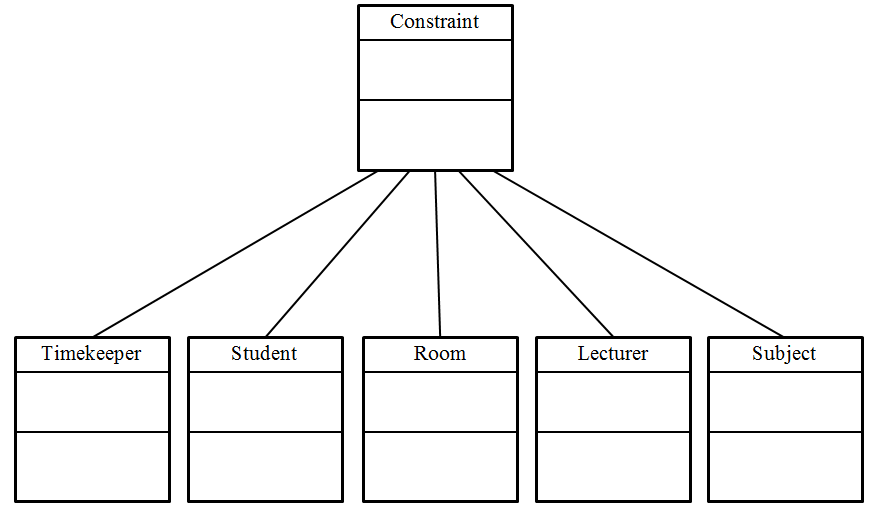
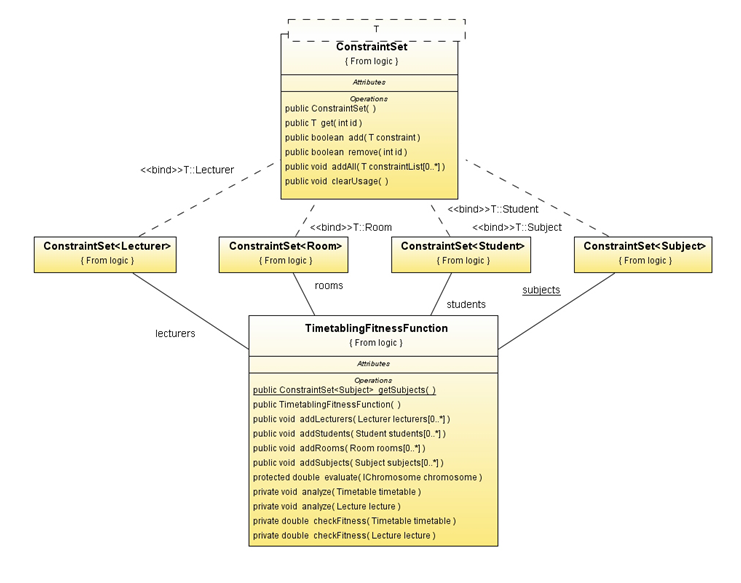
    To Implement a fitness function in this problem. We have to add constrains to be checked in the fitness function. So following structure we implemented for the constrains.

 
At the concrete  implementation of these constrains we follow the following structure,

  1. Setup a Configuration object.
  1. Create a population of potential solutions.

  1. Evolve the population
    Generating a good solution set from the initially created solution set is process of evolution in genetic algorithms. To evolve a population of solutions we took two approaches. One is changing a  chromosome Little bit by changing a lecture time or venue and checking it with the fitness functions to check the fitness. If the fitness is up to some value it will put to the next population. This process is called the mutation process.
    Other process is called the cross over process. In it we took one part form one chromosome and other part form other chromosome. Then we join it to have a new solution. Then we check with the fitness functions to check the fitness. If the fitness is up to some value it will put to the next population.
    So in the evolution process these two happens for the population to get the next population. So what we did was evolving the initial population for number of iteration to get the new populations. At each evolution the population move towards the optimal solution. The number of evolutions is proportional to the correctness of the population. So following graph will show how our implementation behaves with respect to the number of evolutions. Here the y axis gives the fitness value of the population,


So like wise doing number of evolutions we can deduce a good timetable according to our given constrains. We have created a GUI also so user of this solution can change those constraints easily.